Building: Contrails & Cordite
Design notes on building a WW2 aircraft reference site in Next.js with a three-tier image fallback system
First posted: May 11 2026
Read time: 5 minutes
Written By: Steven Godson
Building Contrails and Cordite: A WW2 Aircraft Reference Site in Next.js
A deep-dive into the design decisions, architecture, and image-handling challenges behind a passion project for warplane enthusiasts.
## Where It Started
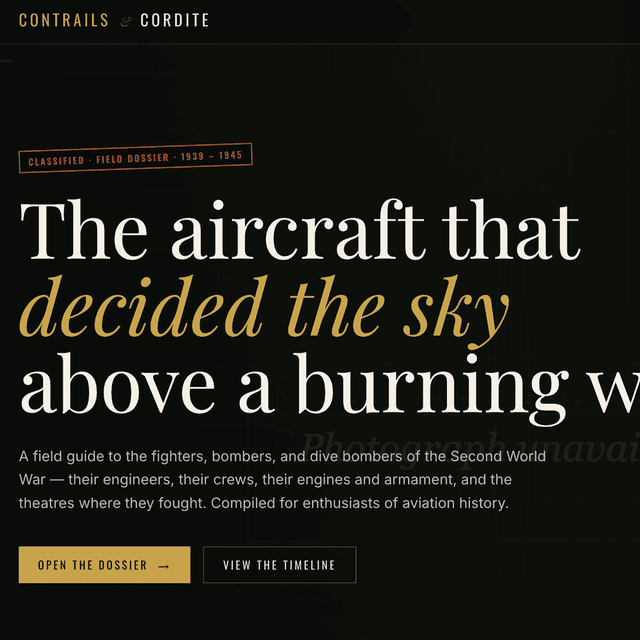
The brief was deceptively simple: build a comprehensive, image-forward reference site for WW2 aircraft enthusiasts using Next.js. No half-measures — every aircraft entry should feel like pulling a dossier out of an intelligence archive. Photographs front and centre, historical detail on every page, and a structure that lets visitors explore by aircraft or by theatre of war.
What followed was an education in the hidden complexity of building a visually rich site around a public image commons that was never designed to be depended upon.
## Information Architecture
I organised the site around two core content types that mirror how enthusiasts actually think about the subject:
Aircraft — individual entries for twelve iconic types, spanning every major air force. The roster covers the Supermarine Spitfire, P-51 Mustang, Bf 109, Mitsubishi Zero, B-17 Flying Fortress, Avro Lancaster, Focke-Wulf Fw 190, Hawker Hurricane, Junkers Ju 87 Stuka, F4U Corsair, P-38 Lightning, and the Messerschmitt Me 262 — the world's first operational jet fighter.
Theatres — five pages grouping aircraft and events by strategic context: Battle of Britain & the West, Eastern Front, Pacific, Mediterranean & North Africa, and Battle of the Atlantic. This axis of navigation exists because the performance envelope of an aircraft only makes sense when you understand the environment it was designed to fight in. A Spitfire and a Zero were contemporaries with broadly similar roles, but they were built for completely different wars.
The site also carries an About page and a hero-driven home screen that sets the atmospheric tone before visitors dive into the catalogue.
## Visual Design Principles
My overriding aesthetic goal was dossier-meets-archive. War photography from 1939–45 has an intrinsic visual authority — grain, contrast, the particular quality of light in a gun-camera frame — and the site's chrome had to earn the right to sit beside it rather than compete with it.
That translated into a handful of hard decisions:
- Photography at full bleed. No thumbnails relegated to a corner. Hero images fill the viewport; card images fill their containers. Text is layered over images using gradient overlays, not placed beside them.
- Dark, muted base palette. Near-black backgrounds (
ink-950) prevent the interface from fighting the photographs for visual dominance. Gold-amber accent tones (c8a44b) nod to period military insignia and instrument-panel gauges. - Monospaced type in supporting roles. Reference labels, classification stamps, and metadata are set in
Courier New— a small detail that commits hard to the dossier metaphor without making body text unreadable. - Restraint in motion. Hover states use
scale-105on images — enough to signal interactivity, not enough to feel playful.
## The Image Problem
The biggest engineering challenge on this project had nothing to do with React or TypeScript. It was photographs.
Wikimedia Commons is the only freely-licensed archive with consistent coverage of WW2 aircraft photography. It has tens of thousands of images. It is also maintained by volunteers who rename, improve, and occasionally delete files without notice. The hash-based CDN URLs that Commons generates (upload.wikimedia.org/wikipedia/commons/a/b3/...) change every time a file is reuploaded. A URL that works today can silently 404 tomorrow.
The naive approach — hard-coding <img src={commonsUrl} /> — produces broken-image icons the moment any URL rots. On a catalogue of twelve aircraft across five theatres, the probability of at least one URL breaking on any given day is uncomfortably high.
The solution I built has three interlocking tiers.
Tier 1: The Proxy Route and URL Helper
Rather than sending the browser directly to upload.wikimedia.org, every image in the data layer is built using a wm() helper function that routes requests through a local Next.js API route (/api/img):
const wm = (file: string, width = 1200): string =>
  `/api/img?file=${encodeURIComponent(file)}&w=${width}`;
The API route fetches from Commons's stable Special:FilePath redirector — a URL that resolves to the current CDN hash for a given filename — on the server side, then streams the result back to the browser with aggressive cache headers (max-age=86400, stale-while-revalidate=604800). The browser never touches Wikimedia's CDN directly, which eliminates CORS friction and keeps image load times predictable.
Crucially, Special:FilePath URLs are stable for a given filename, even when the underlying CDN hash changes. This is a much stronger guarantee than hard-coding the hash URL directly.
Tier 2: The Wikipedia REST API Fallback
If the Commons filename itself has changed — because a volunteer reuploaded a higher-resolution scan under a new name — the proxy returns a 404, and the browser fires the onError event on the image element. At this point, the SafeImage component makes a client-side call to the Wikipedia REST API:
const WIKI_API = 'https://en.wikipedia.org/api/rest_v1/page/summary/';

async function fetchWikiThumbnail(slug: string): Promise<string | null> {
  const res = await fetch(`${WIKI_API}${encodeURIComponent(slug)}`);
  const data = await res.json();
  return data?.originalimage?.source ?? data?.thumbnail?.source ?? null;
}
Each aircraft entry carries a wikiSlug field (e.g. 'Supermarine_Spitfire') that maps to its Wikipedia article, not its Commons filename — a distinction that matters because the two naming conventions often diverge. The REST API returns whatever image Wikipedia is currently using for that article's infobox, which is almost guaranteed to be a high-quality photograph of the correct subject.
Tier 3: The Branded Placeholder
If both network tiers fail — the Commons proxy 404s and the Wikipedia API returns nothing — the SafeImage component falls back to a local SVG placeholder stored in /public/placeholder.svg. This is not a generic grey rectangle. It is a fully branded, inline SVG that looks like a period intelligence dossier — dark linen background, a geometric aircraft silhouette in the site's gold accent colour, and monospaced type reading "Photograph unavailable / NO VISUAL RECORD ON FILE", with a red rubber-stamp UNINDEXED in the corner. It uses only web-safe fonts and zero external resources, so it loads in under a millisecond with complete certainty.
The result is a site where every image position is always occupied by something visually coherent, regardless of what the external archive does.
## The SafeImage Component
The component that orchestrates all three tiers is deliberately a plain <img> element wrapper rather than Next.js's built-in <Image>. This was a pragmatic choice: next/image intercepts onError in ways that make progressive fallback chains unreliable. Using a plain <img> keeps the error-handling logic fully in React's hands.
I track state across three stages and reset on src prop change via useEffect, which prevents a subtle bug where navigating from one aircraft detail page to another could leave the component stranded on a previous entry's fallback URL.
// stage: 0 = primary src, 1 = wiki thumbnail, 2 = placeholder
const [currentSrc, setCurrentSrc] = useState<string>(src);
const [stage, setStage]           = useState<0 | 1 | 2>(0);
Above-the-fold hero images use loading="eager" to hit Largest Contentful Paint targets; card grids use loading="lazy" so the browser only fetches images as they scroll into view.
## Data Layer
Every aircraft and theatre entry is a TypeScript object that carries three image-related fields, enforced by type:
type Aircraft = {
  slug: string;
  name: string;
  image: string;       // proxied URL via wm() helper
  wikiSlug: string;    // Wikipedia article slug for REST API fallback
  imageCredit: string; // free-text credit line for figcaptions
  // ... historical fields
};
Separating image (the Commons filename, routed through the proxy) from wikiSlug (the Wikipedia article identifier) was a design decision that caused me some confusion early in the build — the two values often look similar but refer to different namespaces. Getting this distinction wrong produces fallback chains that skip straight to the placeholder when the primary URL fails, because the Wikipedia API lookup gets called with a Commons filename instead of an article slug.
## What I'd Do Differently
Build the image infrastructure first. I added the proxy route and SafeImage component midway through the project, after discovering that naive image embedding produced a visually broken experience in testing. Starting with the resilient image system and working outward from there would have saved a couple of debugging sessions.
Abstract the **wm()** helper earlier. I lost several hours to broken references after a routing refactor deleted the /api/img route. A centralised image utility with a clear API contract would have made those breakages obvious at compile time rather than runtime.
Consider a build-time image validation step. A CI check that fetches each proxied URL and logs 404s would catch stale Commons filenames before they reach production — something I'd add if I were to revisit the project.
## The Result
Contrails & Cordite is the kind of site that's easy to underestimate from a technical description — "a Next.js catalogue with twelve entries and five category pages" doesn't sound ambitious. The ambition is in the details: in the image system that refuses to show a broken icon, in the placeholder that stays in character when the archive fails, in the design language that earns its place beside seventy-year-old photography.
The codebase is compact and the architecture is straightforward. What took time was getting the small things right — and the image-handling infrastructure, in particular, is a pattern I'd reach for again on any project that depends on community-maintained media archives.
Built with Next.js, TypeScript, and Tailwind CSS. Images sourced from Wikimedia Commons under various public domain and free-use licences.